Yes, you can manually mark yourself as unavailable on wedissimo without affecting your external calendar.
How to block a date:
- Go to Packages and open the packages you want to manage
- Click Manage Availability

- Select the date(s) you want to block, click to select a single date, or drag to select multiple
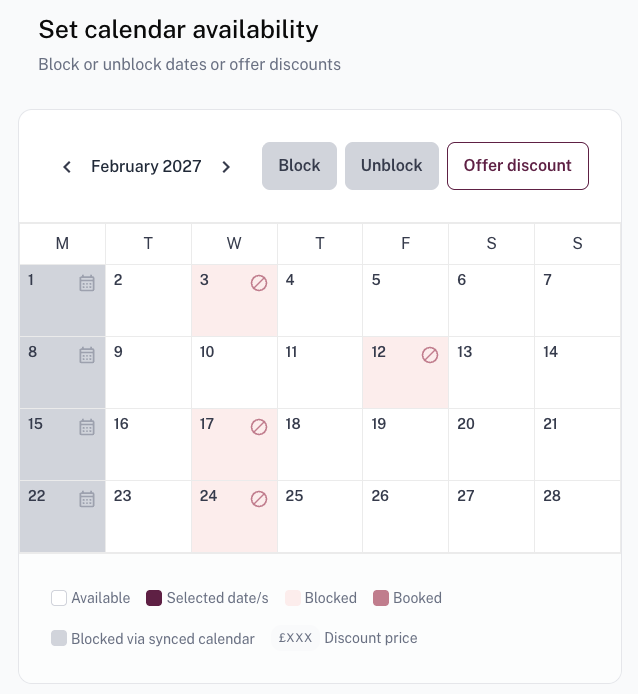
- Click Block to mark yourself as unavailable

To block dates in bulk, scroll below the calendar and set a start date, end date, and the days of the week you want to apply the block to.
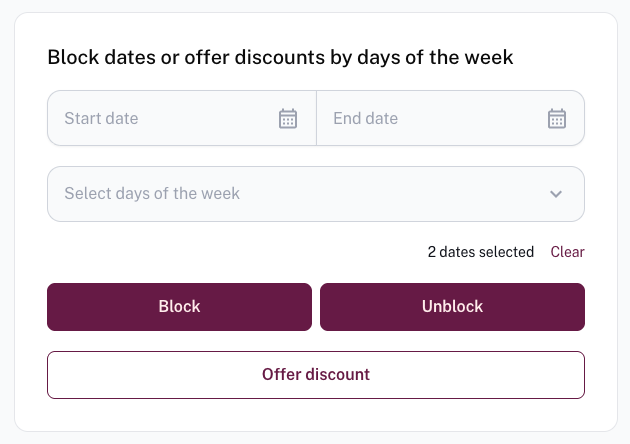
This is package-specific, you can block dates on one package while remaining available on others. For example, you might want to block ceremony-only bookings on peak summer weekends so you're only available for full-day packages.
Please note: This tool can only be used to add blocks. It cannot be used to make yourself available on dates where your external calendar is showing you as busy. Because wedissimo syncs with your external calendar every 5 minutes, any manual override will be reverted automatically.
Was this article helpful?
That’s Great!
Thank you for your feedback
Sorry! We couldn't be helpful
Thank you for your feedback
Feedback sent
We appreciate your effort and will try to fix the article